Build One Useful Agent Workflow, Not Another AI Demo
A practical agent portfolio project should solve one repeated task, show sources and approvals, expose the run log, and make the failure path visible.
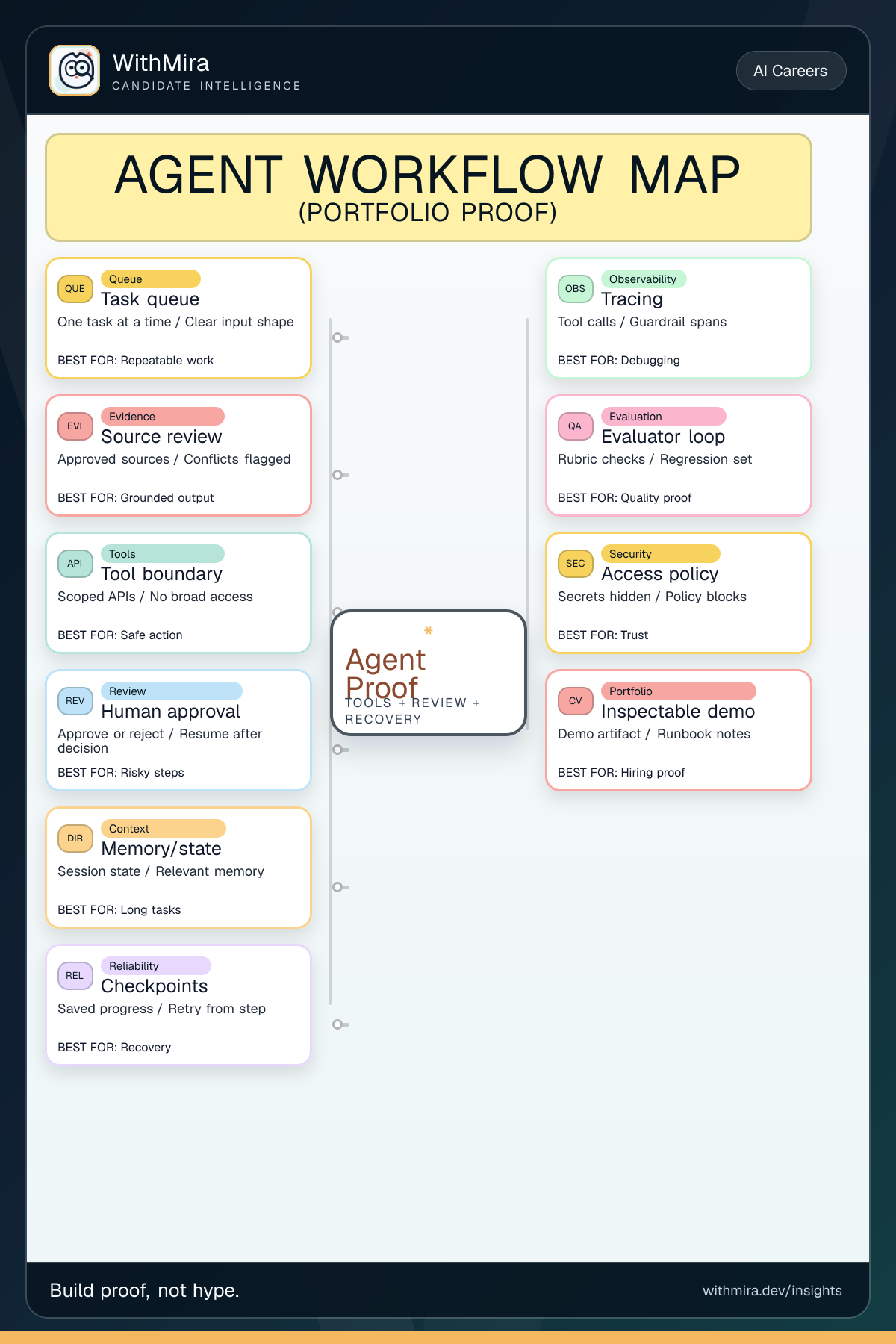
A useful guide for candidates who want one AI agent project that looks credible to hiring teams because it solves a real workflow, shows review, and exposes the tradeoffs.
Why this matters now
Many candidates will add AI agents to their resume in 2026. Most of those claims will look the same. The way to stand out is to show one small workflow that a hiring manager can understand in two minutes: what problem it solves, what information it checks, what tool it is allowed to use, where a human approves the result, and what happens when something fails.
That turns AI from a buzzword into evidence of product and engineering judgment. The hiring signal is not autonomy for its own sake; it is controlled autonomy around a real task.
The project worth building
Do not build a general assistant. Build a workflow assistant for one repeated job. A good example is a release-note helper: it receives merged changes, checks approved source links, drafts a short update, flags missing evidence, asks for approval before publishing, and stores the run history.
The same pattern works for support tickets, candidate outreach, compliance checklists, and job-market summaries. The important part is not that the agent is impressive. The important part is that the reader can see the work was controlled.
What the workflow should include
Use a simple shape. Start with an intake queue so the task is repeatable. Add source review so the answer is not invented. Give the agent one or two narrow tools, not broad access to everything. Add an evaluator step that checks the draft against a rubric. Add a human approval step before any external action. Save a trace or run log so someone can review the decisions afterward. Add a checkpoint so the run can resume after approval or a temporary error.
What to show on the page
The portfolio page should not be only a screenshot of a chat. Show the sample input, the sources the workflow accepted, the sources it rejected, the draft it produced, the approval screen, the final output, and a small run log. Include one failure example: a missing source, a blocked tool call, or a rejected approval. That failure example is valuable because it proves you thought about risk instead of only showing a happy path.
How to explain it in interviews
Use plain language. Say: I picked a repeated task, limited the tools, required sources, added a review gate, logged every step, and designed the failure path.
Then explain one tradeoff. Maybe the workflow is slower because approval is required, but that is acceptable because the action affects customers. Maybe the agent cannot edit records directly, but it can prepare a draft for a human. That is the kind of answer that sounds like someone ready to work inside a real company.
Mistakes to avoid
Avoid a demo that says it can do everything. Avoid tools with unclear permissions. Avoid a result that cannot show where the information came from. Avoid hiding the human review step because autonomy sounds more exciting. In hiring, the more credible story is usually the smaller one: this workflow saves time on a real task, shows its sources, waits before risky actions, and leaves enough evidence for another person to trust it.
Choose the right surface
Task queue
One task at a time Clear input shape
Source review
Approved sources Conflicts flagged
Tool boundary
Scoped APIs No broad access
Human approval
Approve or reject Resume after decision
Memory/state
Session state Relevant memory
Checkpoints
Saved progress Retry from step
Tracing
Tool calls Guardrail spans
Evaluator loop
Rubric checks Regression set
Access policy
Secrets hidden Policy blocks
Inspectable demo
Demo artifact Runbook notes
References
What to do next
- Choose one boring work task that companies actually repeat: support triage, release notes, candidate outreach, compliance review, or job-post analysis.
- Build the workflow as a visible before-and-after demo with source checks, one bounded tool, one approval gate, and a run log.
- Publish the example input, the generated draft, the reviewer decision, and the final result so a hiring team can inspect your judgment.
- Prepare a short interview explanation for what can go wrong and how your workflow stops, retries, or asks for help.
What to remember
A practical agent portfolio project should solve one repeated task, show sources and approvals, expose the run log, and make the failure path visible. The map is useful when it changes what you build next. Pick the smallest workflow or surface that proves judgment, then make the proof inspectable.
- A focused workflow is more credible than a general assistant demo.
- Hiring teams need to see sources, tool limits, approval gates, and run history.
- A visible failure path makes the project more trustworthy, not less impressive.
- The best interview story explains the tradeoff between automation, review, speed, and risk.